
Features / Pwned Passwords Integration
Block Compromised Passwords with Pwned Passwords Integration
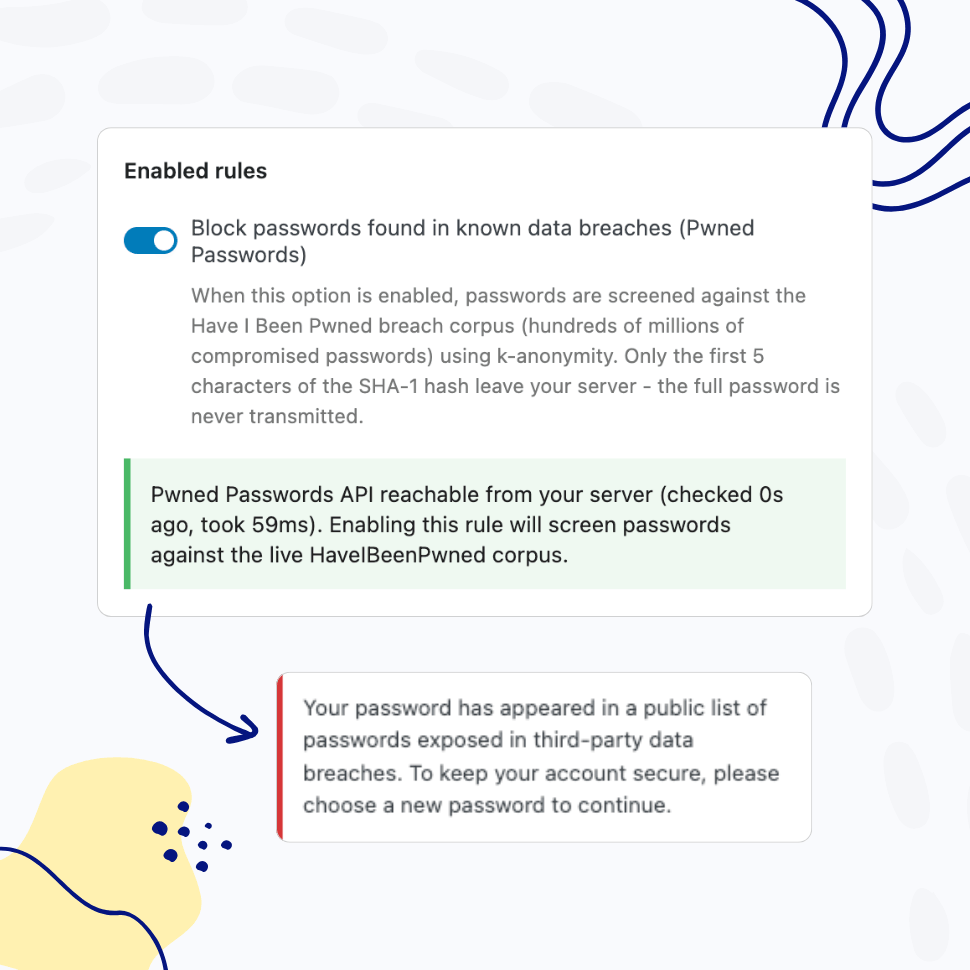
Screen every password against the Have I Been Pwned database of millions of breached credentials1 – on set, on change, and at every login. Catch compromised passwords before attackers do.
- Real-time checks on password set, change, and login
- Privacy-preserving k-anonymity API – passwords never leave your site
You’re fully covered by our 30-day risk-free money-back guarantee.
Strong-looking passwords get breached every day. Your policy needs to know.
Password complexity rules – length, character classes, dictionary blocklists – were designed for a world before mass credential breaches. Today, your users routinely reuse passwords that already appear in public breach dumps. “Summer2025!” passes every complexity check ever written. It also appears in dozens of public breach corpora.
This is why NIST SP 800-63B2, the United States federal digital identity guidance that informs many international password standards, explicitly requires verifiers to compare new passwords against a list that contains values “known to be commonly-used, expected, or compromised” – including passwords from previous breach corpora. Major identity providers, browser vendors, and password managers now routinely implement some form of breach-password screening in their own products. Most WordPress sites do not.
WP Password Policy PRO’s Pwned Passwords Integration closes that gap by connecting your site to Have I Been Pwned’s Pwned Passwords database – the same data source used by 1Password’s Watchtower feature34 and Mozilla Monitor56, has received compromised password contributions from the UK National Crime Agency and the FBI78910, and is referenced in public password guidance from the UK National Cyber Security Centre11 – and screening every password in real time.
Real-Time Breach Screening
Check Every New Password Against Millions of Breached Credentials
Every time a user sets or changes their password, WP Password Policy queries the Have I Been Pwned Pwned Passwords database – currently hundreds of millions unique breached password hashes drawn from real-world data breaches.
If the password appears anywhere in that corpus, the user is asked to choose another one. No configuration, no list to maintain, no manual updates. The database itself is continuously updated by Have I Been Pwned as new breaches surface12.
Continuous Login-Time Protection
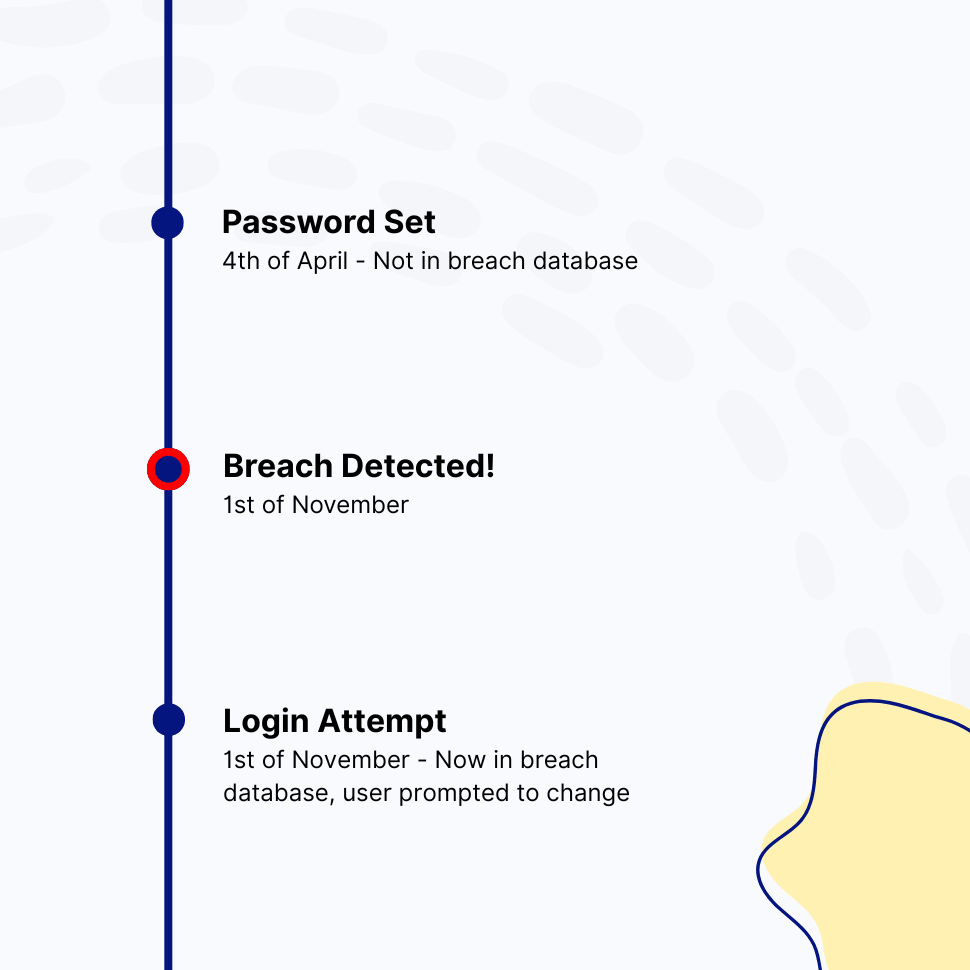
A Password Safe Yesterday Can Be Breached Today
Password that was safe when your user set it last year may have appeared in a breach this week. Pwned Passwords Integration re-screens passwords on every successful login. If a previously-clean password now matches a breach record, the user is prompted to change it before continuing – protection that follows your users through the entire lifetime of their account, not just the moment of creation.
Privacy by Design
Passwords Never Leave Your Site
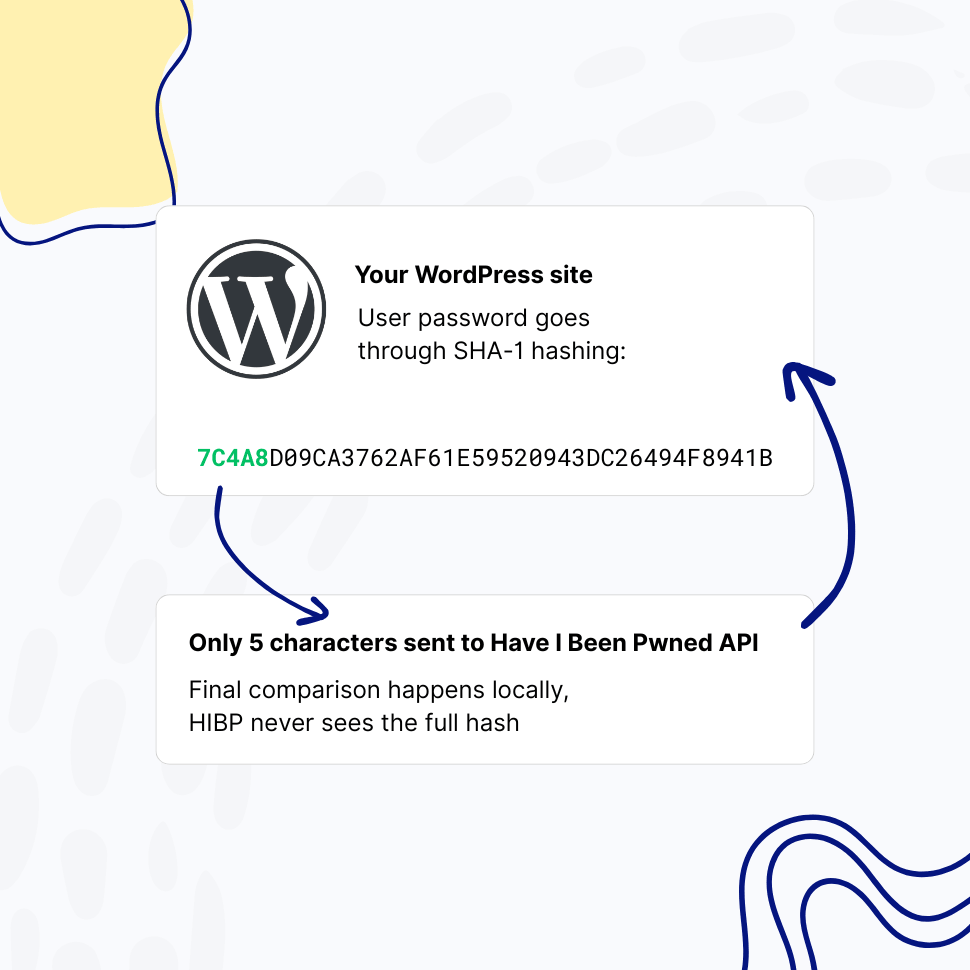
The integration uses Have I Been Pwned’s k-anonymity API13. Your users’ passwords are hashed with SHA-1 locally, and only the first five characters of the hash are sent to Have I Been Pwned. The API returns every hash in that prefix range – typically a few hundred candidates – and the comparison happens entirely on your server.
Have I Been Pwned never sees a full hash, let alone a password. The API is delivered through Cloudflare’s global edge network, and the k-anonymity approach aligns with GDPR data minimization principles. No API key required.
Built for Compliance-Driven Teams
A Documented Technical Control for Modern Password Frameworks
Compliance frameworks have evolved alongside the breach landscape. NIST SP 800-63B – the U.S. federal digital identity guidance that informs many international password standards – explicitly requires verifiers to compare new passwords against a list of “known to be commonly-used, expected, or compromised” values.
Pwned Passwords Integration provides that technical control directly. When you’re working toward PCI DSS, HIPAA, SOC 2, or similar frameworks, this feature gives you a documented, configurable, auditable enforcement point you can show your assessor – to be paired with the policy documentation, training, and other controls those frameworks require.
Why Blocking Breached Passwords Is Now a Baseline Security Control
Credential stuffing is among the most common attack vectors against WordPress sites. Attackers do not guess passwords. They take credentials leaked from one breach – a forum, a retailer, a content site – and try them at scale against thousands of other sites, exploiting the simple fact that many users reuse the same password across multiple services. By the time a breach is public, the credentials have already been weaponized.
The Real Threat: Credential Stuffing at Scale
A typical credential stuffing campaign tests millions of username and password pairs across hundreds of target sites within hours. The economics work because password reuse is widespread – every major industry study of consumer password habits finds that a substantial proportion of users reuse passwords across services, and that reuse rates climb among lower-value or rarely-visited accounts. From an attacker’s perspective, every breached credential is a probabilistic key against every WordPress site on the internet. Strong password complexity rules do nothing to stop this. A password like “Tr0ub4dor&3” wasn’t weak in any traditional sense – but if it has been breached, it is compromised. That distinction is exactly what Pwned Passwords Integration enforces.
How the Have I Been Pwned Database Works
Have I Been Pwned, maintained by security researcher Troy Hunt since 2013, aggregates breach corpora from public sources, security partners, and law enforcement agencies. The Pwned Passwords subset currently contains hundreds of millions unique SHA-1 hashes representing passwords that have appeared in real-world breaches at least once. The dataset is updated continuously as new breaches surface, and is distributed through a free API delivered through Cloudflare’s global edge network.
The dataset is widely treated as a de facto reference for known-compromised passwords across the security community, and is used by password managers, browser vendors, government agencies, and identity providers around the world. By integrating directly with this database, your WordPress site benefits from the same threat intelligence that informs password security at many of the largest organizations in the world – without you having to maintain anything.
Privacy, Performance, and the K-Anonymity Model
A naive implementation of “check this password against a breach list” would either require downloading a multi-gigabyte hash dataset onto every WordPress site, or sending the password (or its full hash) to a third-party API. Both approaches fail in production: one is operationally untenable, the other introduces a serious privacy and trust problem.
Have I Been Pwned solves this with the k-anonymity model. Your server computes the SHA-1 hash of the user’s password and sends only the first five hexadecimal characters – the “prefix” – to the API. The API responds with every full hash in its database that starts with those five characters, typically a few hundred entries. Your server then does the final comparison locally. Have I Been Pwned cannot reconstruct your user’s password, cannot identify which specific hash you were checking, and your password never leaves your infrastructure in any usable form. The whole exchange typically completes in well under a second and adds no perceptible latency to login or password-change flows.
Setting It Up in WordPress
Pwned Passwords Integration is included in WP Password Policy PRO and is enabled with a single toggle. There are no API keys to manage, no rate limits to monitor for normal-volume sites, and no separate accounts to create. You can configure whether checks run on password set, on password change, on login, or all three, and you can scope the policy to specific user roles – for example, requiring breach screening for administrators and editors while keeping a softer policy for low-privilege roles.
Combined with WP Password Policy’s existing controls – complexity enforcement, restricted passwords list, passwords reuse prevention, and healthy passwords retention – you get a layered password security posture that supports the password-related requirements of major compliance frameworks.
FAQ
Frequently Asked Questions
Is my users’ password data sent to Have I Been Pwned?
No. The integration uses Have I Been Pwned’s k-anonymity API, which means only the first five characters of the SHA-1 hash of a password are transmitted. The API returns a list of hashes that share that prefix, and the final comparison happens locally on your server. Your users’ passwords – and even their full hashes – never leave your site.
Does this slow down login or password changes?
The Have I Been Pwned API typically responds quickly thanks to Cloudflare’s global edge caching. For most sites the additional latency is imperceptible. If the API is temporarily slow or unreachable, you can configure WP Password Policy PRO to either allow the action (fail open) or block it (fail closed) depending on your security posture.
What happens if the Have I Been Pwned API is unreachable?
You choose. By default, WP Password Policy PRO fails open on login (allows the user in), but that can be set to fail-close to block the action and surface a clear error message.
How current is the breach database?
The Have I Been Pwned Pwned Passwords database is updated continuously as new breaches are processed. The integration always queries the live API, so you are always checking against the latest dataset without any updates on your end.
Do I need a Have I Been Pwned API key?
No. The Pwned Passwords API is free, requires no authentication, and is suitable for normal-volume use without rate-limit concerns when used with the k-anonymity range endpoint that WP Password Policy PRO uses.
Does this replace the Restricted Passwords List feature?
No, they are complementary. The Restricted Passwords List is for common weak passwords, as well as passwords specific to your organization – your company name, product names, internal jargon, or any other context-specific weak passwords. Pwned Passwords Integration covers the global universe of passwords that have appeared in real-world breaches. Most security-conscious sites use both.
Is this feature available in the free version?
Pwned Passwords Integration is available exclusively in WP Password Policy PRO.
Does using this feature make my WordPress site PCI DSS, HIPAA, or SOC 2 compliant?
No single feature makes a site compliant with any of these frameworks. Compliance is determined by your full set of technical controls, documented policies, training, monitoring, and independent assessment. What this feature provides is one concrete, configurable, auditable technical control that maps to the password-screening requirements in NIST SP 800-63B section 5.1.1.2, and to the spirit of password-related controls in PCI DSS, HIPAA, and SOC 2.
You should consult with your compliance auditor about the specific requirements of your framework and how this control fits into your broader program. See compliance disclaimer below for more details.
Features
Explore These Powerful Features Next
Discover the features offered by the WP Password Policy plugin for WordPress.
Vendor-Default Account Scanner
Automatically scan your site for default or admin-style usernames and unchanged display names, then review and fix the risky accounts attackers target first.
Pwned Passwords Integration
Screen every password against the Have I Been Pwned database of breached credentials, blocking passwords already exposed in known data breaches.
Password Complexity Enforcement
Ensure user passwords include uppercase and lowercase letters, digits, special characters, and unique (non-repeated) characters – while limiting consecutive symbols from the user’s name.
Dedicated Policies by User and/or Role
Apply password policies to specific users by username or user role. Create dedicated password policies for vendors, freelancers, or users with higher permissions – giving you complete control over your security settings.
Customizable Password Policy Rules
Easily tailor password policy rules to meet your organization’s security needs. Enable or disable specific rules and adjust all settings with flexibility.
Healthy Passwords Retention
Ensure your website’s security by defining clear password retention rules, reducing the risk of compromised accounts.
Restricted Passwords List
Ensure users avoid weak passwords such as “admin,” “password,” or “johnny123.” Use the predefined list provided by this plugin and freely adjust it to meet your specific needs.
AI Integration
Connect your WordPress site to AI assistants like Claude, ChatGPT, or any MCP-compatible tool and manage your password policies through simple, conversational commands.
Easy Setup & Configuration
Set up password policies in just a few clicks – no complex configurations required. With preconfigured defaults, you’re ready to go in minutes.
Passwords Reuse Prevention
This feature prevents users from reusing previous passwords, requiring them to create a completely new one instead of relying on their favorite.
Compliance Disclaimer
This page discusses how WP Password Policy’s Pwned Passwords Integration relates to password security requirements in widely-recognized frameworks including NIST SP 800-63B, PCI DSS, HIPAA, and SOC 2. References to these frameworks are provided for informational purposes only and are not legal, regulatory, or compliance advice.
Compliance with any specific framework is determined by the totality of your organization’s controls, documented policies, training, monitoring, and independent assessment by qualified auditors – not by any single product feature. WP Password Policy provides technical password controls that can support a broader compliance program; it does not certify compliance and does not substitute for a qualified compliance assessment.
Specific requirements vary by framework version, by industry, by jurisdiction, and by the scope of your assessment. You should consult with a qualified compliance professional, auditor, or attorney for guidance specific to your organization. Teydea Studio, the publisher of WP Password Policy, makes no representation or warranty that use of this product alone will result in compliance with any standard, regulation, or law.
WP Password Policy is an independent product and is not affiliated with, endorsed by, or sponsored by Have I Been Pwned, Cloudflare, or any of the standards organizations referenced on this page.
Footnotes
- https://haveibeenpwned.com/Passwords ↩︎
- https://pages.nist.gov/800-63-3/sp800-63b.html ↩︎
- https://1password.com/haveibeenpwned ↩︎
- https://blog.1password.com/finding-pwned-passwords-with-1password/ ↩︎
- https://support.mozilla.org/en-US/kb/mozilla-monitor-faq ↩︎
- https://blog.mozilla.org/blog/2018/09/25/introducing-firefox-monitor-helping-people-take-control-after-a-data-breach/ ↩︎
- https://www.troyhunt.com/open-source-pwned-passwords-with-fbi-feed-and-225m-new-nca-passwords-is-now-live/ ↩︎
- https://www.bleepingcomputer.com/news/security/uk-govt-shares-585-million-passwords-with-have-i-been-pwned/ ↩︎
- https://therecord.media/the-nca-shares-585-million-passwords-with-have-i-been-pwned ↩︎
- https://www.infosecurity-magazine.com/news/uk-cyber-cops-225-million/ ↩︎
- https://www.ncsc.gov.uk/news/most-hacked-passwords-revealed-as-uk-cyber-survey-exposes-gaps-in-online-security ↩︎
- https://haveibeenpwned.com/About ↩︎
- https://www.troyhunt.com/ive-just-launched-pwned-passwords-version-2/ ↩︎